

Overview
The Spark360 Lead Dashboard is your central command center for managing, prioritizing, and acting on inbound leads generated through your Spark. It is designed to answer three questions for every lead:- Is this lead valid? -> Lead Score
- Can they pay? -> SurePay Score
- Will they upgrade? -> Elevate Score
Dashboard Layout
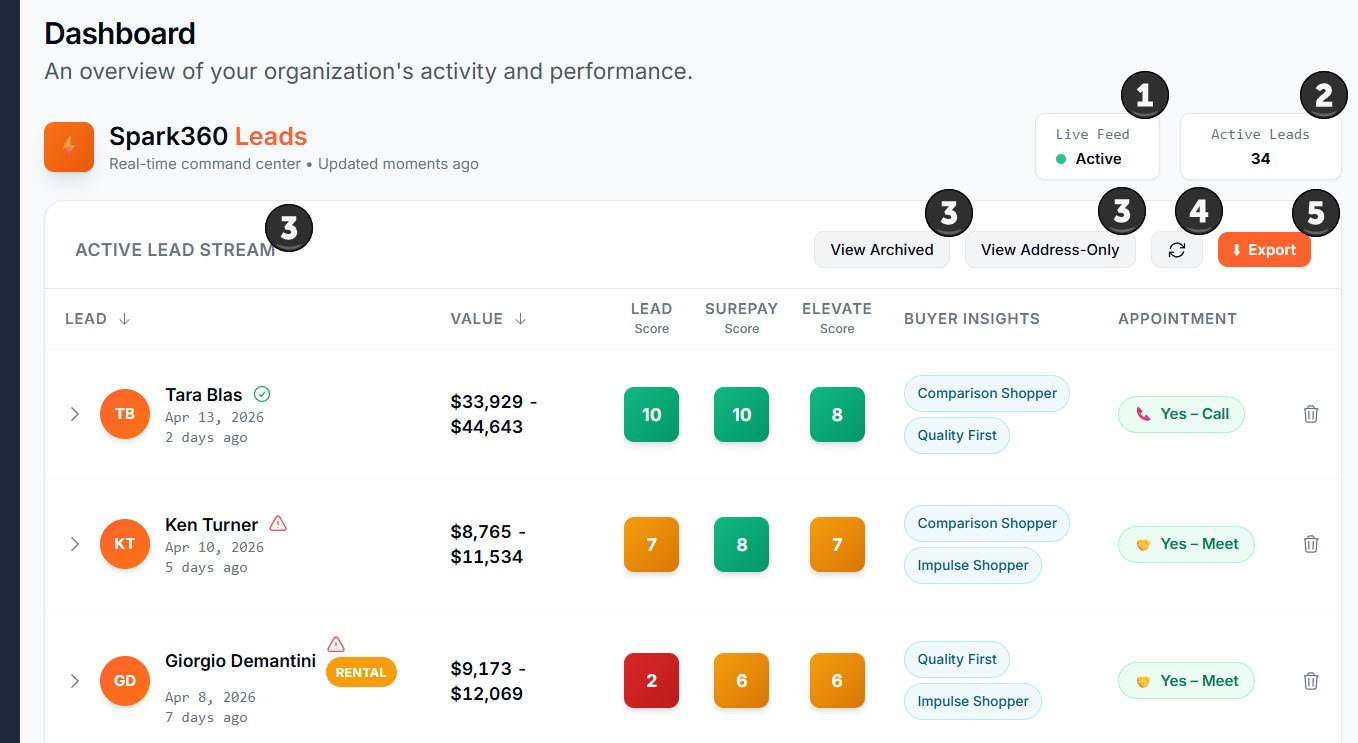
(1) Live Feed Status Indicator
Shows whether your Spark is actively capturing leads.- Green = Active. Leads are captured in real time.
- Orange = Inactive. No leads will be captured.
(2) Active Leads Counter
Total number of leads in your active queue ready for follow-up.(3) Lead Views
Three views to organize your leads:- Active — Completed leads ready for action
- Archived — Previously removed leads (not deleted, recoverable)
- Address-Only — Incomplete submissions where a homeowner entered an address but did not complete the process
Address-Only leads are not counted toward subscription limits. They can be valuable for remarketing purposes.
(4) Refresh Icon
Click to load the latest lead activity. An orange dot on the refresh icon means new activity is available since your last refresh.(5) Export Button
Downloads your current lead view as a CSV file. The export includes all expanded data fields for each lead.Reading the Lead Table
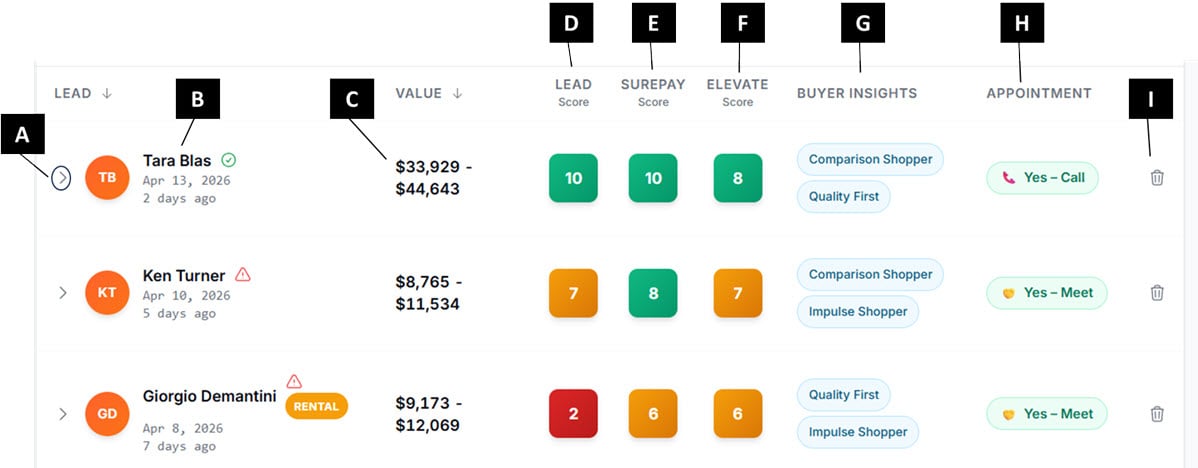
(A) Expand Arrow
Click the arrow to expand a lead row and view full lead details including property information, integrity breakdown, roof estimate, and follow-up request.(B) Lead
Displays the lead’s name, submission time, and time elapsed since submission. Icons that may appear:- ✅ Valid lead — no integrity issues detected
- ⚠️ Warning — a potential data issue was detected (name mismatch, zoning issue, or no confirmed structure). Verify before dispatching a rep.
- 🏘️ Rental tag — the lead-score assessment reports an occupancy defect, including when owner occupancy is unknown (for example an LLC or trust on the deed). This tag does not read the Owner-Occupied field.
- Trust tag — violet TRUST pill. The owner of record appears to be a trust or estate. Informational only; it does not change the Lead Score. It helps you prepare for a different decision-maker before making contact.
- Business tag — blue BUSINESS pill. The owner of record appears to be a business entity (LLC, Corp, Inc, and similar). Informational only; it does not change the Lead Score. It helps you prepare for a different decision-maker before making contact.
(C) Value
Estimated project value range based on roof size, materials, and complexity. Use this to prioritize high-value opportunities.(D) Lead Score
Measures how reliable the lead data is. See Understanding Your Scores below for full detail.(E) SurePay Score
Indicates the likelihood the homeowner can pay or qualify for financing. See Understanding Your Scores below.(F) Elevate Score
Indicates the likelihood the homeowner will choose premium options or upgrades. See Understanding Your Scores below.(G) Buyer Insights
Shows the top two buying behavior profiles and their associated Sales Hacks — instant guidance on how to approach this homeowner. See Buyer Insights & Sales Hacks below.(H) Appointment
Indicates whether the homeowner submitted a follow-up preference:- 📞 Call — time preference provided
- 📅 Appointment — date and time selected
- No icon — no follow-up request submitted
(I) Archive
Click to move a lead out of your Active view. Archiving does not delete the lead — it can be recovered at any time from the Archived view.Score Color Bands
All three scores use the same color system:Expanded Lead View
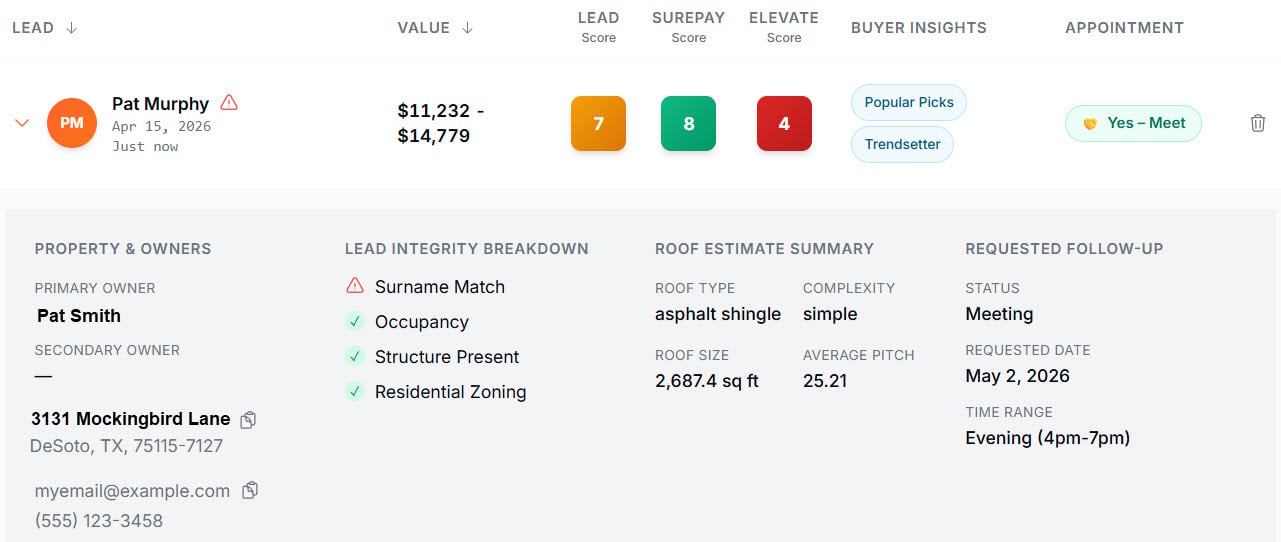
(1) Property & Owners
Displays the property address, legal owner names on record, and contact details when provided. If the name submitted by the homeowner does not match the name on the deed, the Lead Score will reflect this as a defect.(2) Lead Integrity Breakdown
Shows the individual validation checks that contribute to the Lead Score:- Surname Match — does the submitted name match the deed?
- Owner Occupancy — is the owner confirmed to live at the property?
- Structure Present — is a structure confirmed at this address?
- Residential Zoning — is the property confirmed as residential?
(3) Roof Estimate Summary
Provides roof details used to calculate the estimated project value:- Roof type and materials
- Size (square footage)
- Pitch and complexity
(4) Requested Follow-Up
If the homeowner completed the optional contact step, this section displays:- Preferred contact type (call or appointment)
- Requested date and time range
Understanding Your Scores
Lead Score (Validity Score)
Measures the reliability of the lead based on four validation checks: surname match, owner occupancy, structure presence, and residential zoning. How to use it:- High score (8–10) → Safe to dispatch a rep
- Medium score (6–7.9) → Use judgment; review the integrity breakdown
- Low score (below 6) → Call and verify before sending a rep
SurePay Score
Indicates the likelihood the homeowner will pay for services or qualify for financing. Use this to assess financial risk before committing resources to a lead.Elevate Score
Measures the homeowner’s receptiveness and financial ability to invest in premium options or upgrades.Use the Elevate Score to decide whether to lead with your premium product line. A score of 8 or above is a strong signal to present higher-end options first.
Buyer Insights & Sales Hacks
Buyer Insights identifies the top two buying behavior profiles for each homeowner, powered by Spark360’s data intelligence partnership. Each profile comes with a Sales Hack — instant, actionable guidance on how to tailor your sales approach.Sales Hacks are only provided when the associated Buyer Insight score meets or exceeds 8. If a score is below this threshold, no Sales Hack is shown for that profile.
Lead Lifecycle
- Address submitted — homeowner enters their address. Appears as Address-Only.
- Project details entered — roof details collected. Not yet visible as an Active lead.
- Estimate generated — roof value calculated.
- Scores and insights appended — Lead Score, SurePay, Elevate, and Buyer Insights added.
- Lead appears as Active — ready for follow-up.
Only completed leads appear in your Active view. Address-Only leads are accessible separately and are not counted toward your subscription limits.
Managing Leads
Archiving a Lead
Click the archive icon (column I) on any active lead to move it to your Archived view. Archiving removes the lead from your active queue but does not delete it.Recovering an Archived Lead
Navigate to the Archived view using the Lead Views control. Locate the lead and click the restore icon to return it to your Active view.Address-Only Leads
Access Address-Only leads using the Lead Views control. These leads submitted an address but did not complete the full widget process. They are useful for remarketing and neighborhood canvassing.Best Practices
- Prioritize high value + high scores — Focus first on leads with high estimated value and strong Lead Scores.
- Verify before dispatching — A low Lead Score does not mean discard. Call the homeowner first to verify.
- Respond quickly — Speed of response directly impacts close rates.
- Use Buyer Insights — Tailor your pitch before picking up the phone. A 30-second review of the Buyer Insights profile can meaningfully change your approach.
- Don’t ignore Address-Only leads — These are warm prospects in your area. Consider canvassing or targeted outreach.